
📍 Journey Navigation Prev: Day 2 — Theory First, Chaos Later · Next: Day 4 — Nmap & Firewalls | Day 1 | Day 3 | Day 5 | Day 6 |
Status: Day 3 of 90-day AI Security journey
The Shift: Theory → Reality
Yesterday was all theory: 34 concepts, attack patterns, defense strategies. Today was the moment of truth — implementing what I learned.
The goal: Build a lab where I can see packets flowing, control traffic with firewalls, and understand VPN/tunneling before diving into projects.
Challenge: Mac M4 + VMware Fusion = no pfSense (ARM architecture issue). So I improvised with Ubuntu as router/firewall.
Result: A working attack-defense lab that actually teaches threat mindset.
What I Built Today
The Lab Architecture
Instead of pfSense, I created this:
Kali (Attacker) ──┐
Ubuntu Client ────┼── [LAN] ── Ubuntu Router ── [WAN] ── Internet
Ubuntu Server ────┘
Machines:
- Kali Linux: Attacker (scanning, sniffing, attacks)
- Ubuntu Client: Normal user (browsing, traffic generation)
- Ubuntu Server: Target (web server, services)
- Ubuntu Router: Firewall + NAT (controls all traffic)
Networking: Host-only LAN (192.168.100.x) + NAT WAN
The Setup Journey (What Actually Worked)
Router Configuration (The Hardest Part):
- 2 NICs: ens160 (WAN/NAT) → 192.168.25.x, ens256 (LAN) → 192.168.100.1
- IP forwarding:
echo 1 | sudo tee /proc/sys/net/ipv4/ip_forward - NAT:
iptables -t nat -A POSTROUTING -o ens160 -j MASQUERADE - Forwarding rules for traffic flow
Client/Server Setup:
- Static IPs: Client (.20), Server (.30), Kali (.10)
- Gateway: 192.168.100.1 (router)
- DNS: 8.8.8.8
Testing: Ping router → ping internet → curl web server
The Packet Revelation
This is where theory became visceral.
Wireshark Capture (The Eye Opener)
Started web server: python3 -m http.server 8080
From client: curl http://192.168.100.30:8080
In Wireshark (filter: tcp):
- SYN packet (client initiates)
- SYN-ACK (server responds)
- ACK (connection established)
Then HTTP data:
- GET / HTTP/1.1
- Host: 192.168.100.30:8080
- User-Agent: curl/...
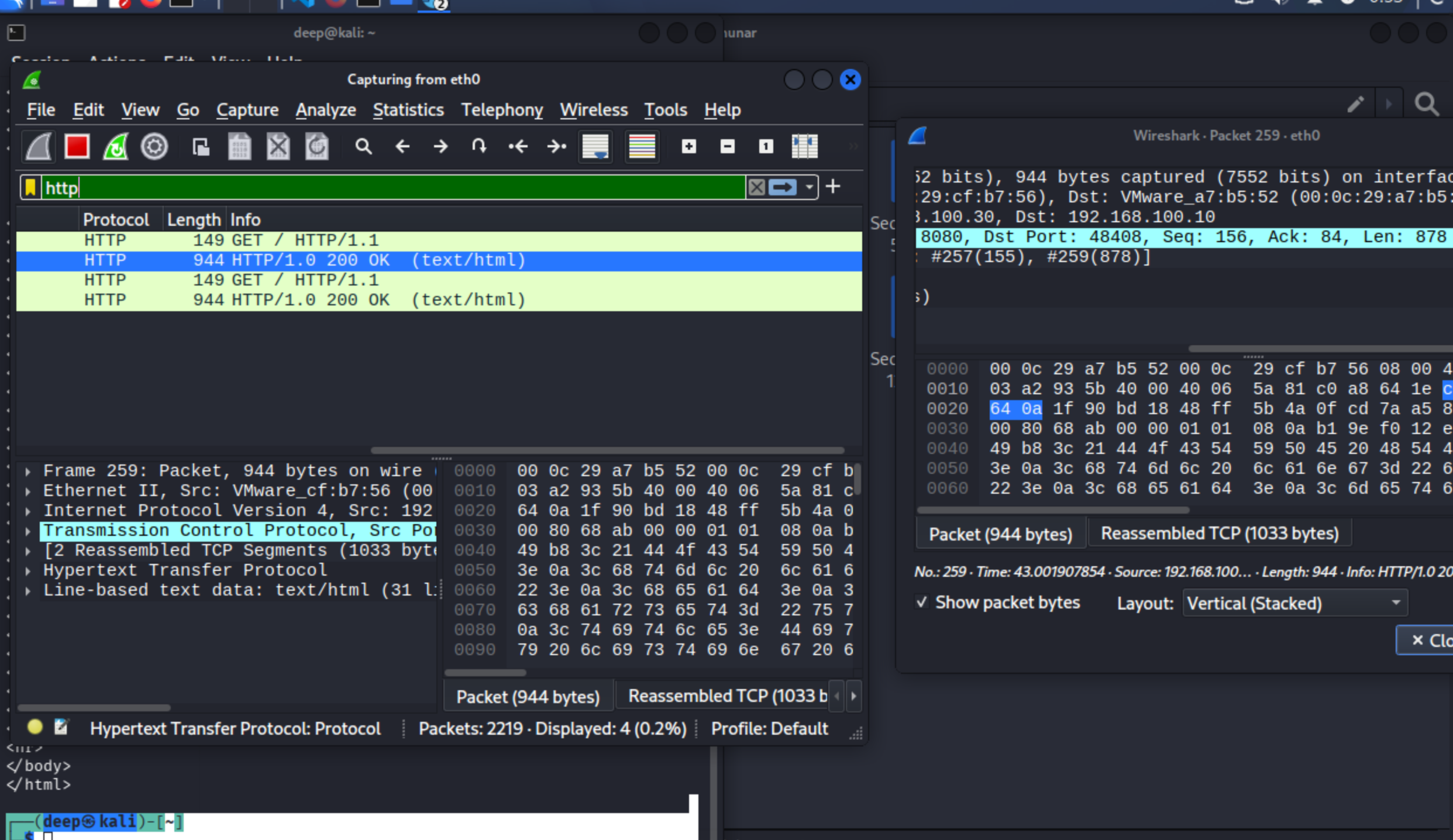
Realization #1: This is PLAINTEXT. Anyone on the network can read it.
Attacker Perspective
From Kali:
nmap 192.168.100.30→ Port 8080 opencurl http://192.168.100.30:8080→ Same access as client
In Wireshark: I could see Kali's traffic too.
Realization #2: Attackers see everything. No encryption = no privacy.
Firewall Control (Defense in Action)
On router: sudo iptables -A FORWARD -p tcp --dport 8080 -j DROP
Test curl again: Connection refused
In Wireshark: SYN sent, no response. Packet dropped.
Realization #3: Firewalls = traffic police. They decide what lives/dies.
What I Learned (The Real Insights)
1. Networking is Architecture
Building this lab showed me:
- Routers aren't magic — they're just IP forwarding + NAT
- Firewalls aren't complex — they're just iptables rules
- Networks aren't abstract — they're packet flows you can see
2. Attacker Mindset Starts Here
Seeing HTTP data in Wireshark made me think:
- "What if this was a login form?"
- "What if this contained API keys?"
- "How would I capture this in a real attack?"
3. Defense is Proactive
Blocking port 8080 made me realize:
- Attack surface = exposed ports
- Hardening = closing unnecessary doors
- Monitoring = seeing the attempts
4. Tools Are Just Interfaces
Wireshark, iptables, nmap — they're not "hacking tools." They're windows into how systems work.
The Technical Wins
- NAT Working: Machines access internet through router
- Firewall Functional: Can block/allow traffic
- Packet Visibility: TCP handshakes, HTTP requests, drops
- Attack Simulation: Scanning, access, observation
Tomorrow: Encryption & Tunneling
Now that I see plaintext, next is:
- VPN setup (encrypt traffic)
- SSH tunneling (hide traffic)
- Compare encrypted vs clear packets
Then: Reverse shells, forensics, hardening.
The Bigger Picture
Day 1: Theory foundation Day 2: Structured learning plan Day 3: Hands-on lab reality
This is the right pace. Theory without practice = useless. Practice without theory = confusing.
Now I have both.
Day 3 of 90 | Week 1 Lab Setup: ✅ Complete | Packet Analysis: ✅ Working | Next: VPN/Tunneling
🔗 Related Posts
- Day 2 — Theory First, Chaos Later — The 34 concepts and structured plan that made today's lab make sense
- Day 4 — Nmap, Firewalls & the Attacker's View — Taking this lab further with nmap scanning & iptables deep-dive
- Day 5 — HTTP, Reverse Shells & Three Minds — The payoff: firing reverse shells and the three-perspective model
- Day 6 — The Wiretap Protocol — ARP spoofing and MITM on this same lab network